Convert PowerPoint To Video - Acoolsoft PPT2Video Converter
Legacy signals
Legacy popularity: 1,467 legacy views
Reader rating
Not enough ratings yet
Aggregate average appears after enough eligible reader ratings.
Rate this resource
Sign in to rate this resource.
Powerful functions, stable conversion process and stunning video quality will make your presentation more professional and interesting.
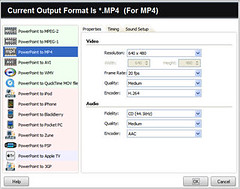
nAcoolsoft PPT2Video Converter is designed to help you convert PowerPoint Presentations to stunning videos. With only 3 clicks, you can convert PowerPoint presentations to video formats such as MPEG, AVI, MP4, WMV, MOV, 3GP with excellent quality.
nnAcoolsoft PPT2Video Converter will make you look like a pro even if you never did this before!
n- n
- Easy to use that adapt to you n
- Optimized using experience n
- Excellent conversion efficiency and stability n
- Up to 9 PowerPoint files batch conversion n
- Comprehensive settings for flexible customization
Whats new in Acoolsoft PPT2Video Converter version 1.1.0
n- 1. Highly optimized conversion efficiency
The new version of PPT2Video Convert employs an optimized algorithm, which improves conversion speed to 50%. At the same time, the output file size is reduced. Besides, the conversion process is more stable.n2. Greatly improved video quality
The video produced by the new version are more stable and clear. The output video could be as good as the original presentation.n3. Comprehensive settings
More settings are provided in the new version. You can highly customize the output video to meet specific needs.
Screenshots
n

A cool, professional PowerPoint to video conversion tool and more
nHave you ever thinking about being able to show your wonderful PowerPoint presentations to anyone, anywhere and anytime? Imagine that its easy. Now youve the solution which is Acoolsoft PPT2Video Converter.
nWith this smart and powerful tool, you can convert your PowerPoint to common video formats and make your PowerPoint presentations to reach more people in a different way. Which will makes your life and work easier and pleasure too.
nIts great for: n
- n
- - Showing presentations without the need for PowerPoint n
- - Distributing your slideshows to friends and colleagues n
- - Converting your PowerPoint presentation to video file e.g. AVI, WMV n
- - Converting your PowerPoint presentation to streaming video clip to show on the internet e.g. WMV,AVI n
- - Giving your PowerPoint presentation a video look n
- - Converting PowerPoint to MPEG-4 video to play on portable devices such as iPod, Zune, iPhone, Apple TV, BlackBerry, Pocket PC and so on
V 1.1.0 No time limit free trial , Try it today and discover more nWe try our best to help you through the test. Acoolsoft PPT2Video Converter will make you look like a pro even if you never did this before!
nnArticle author
About the Author
Further reading
Further Reading
Article
What to Consider When Adopting Multi-Tenancy in Kubernetes?
Organizations are starting to scale their cloud native operations. And as they do, the inefficiency of managing dozens of isolated clusters has become an evident problem. As the clusters continue to sprawl, businesses must unite diverse workloads onto shared infrastructure. This is because companies need better resource utilization and centralized governance among other things. But it is imperative to remember that going from a single tenant to a multi-tenant environment need
March 12, 2026
Article
Product Engineering Services: Driving Faster Development for Startups
It has been for everyone to see the short product lifecycles and a pressing need for rapid technical scalability that have come to define the modern startup ecosystem. For early-stage companies, the challenge is no longer just conceptualizing a solution. But they must also carry it out with enough precision to withstand high market volatility and fierce competition. We know that internal teams concentrate on core business strategy and fundraising. That still leaves us with th
March 12, 2026
Article
Why Modern Facilities Rely on Environmental Monitoring and Remote Temperature Probes for Compliance and Control
In today’s regulated and data-driven environments, organizations are under constant pressure to ensure that temperature and environmental conditions remain within defined limits. Even small fluctuations can result in product loss, compliance violations, or operational downtime. As a result, many facilities are moving away from manual checks and standalone sensors and adopting comprehensive environmental monitoring solutions instead. An environmental monitor provides rea
March 5, 2026
Article
Role of Data Warehousing in Ensuring Data Quality and Consistency
Organizations have come to rely heavily on large amounts of data in today's competitive markets. But to what end? For starters, to inform strategic decisions and power machine learning models. It goes without saying that the value of these digital assets is completely dependent on the accuracy of the underlying data. So, when data is fragmented or inconsistent across departments, you will obviously have inaccurate reporting and operational inefficiencies at your hands. This c
March 2, 2026